
15.1 Introduction #
BGP (Border Gateway Protocol) is a distance vector routing protocol that enables route reachability between AS (Autonomous System) and selects the best route.
To facilitate the management of the growing network, the network is divided into different autonomous systems. In 1982, the Exterior Gateway Protocol (EGP) was used to dynamically exchange routing information between ASes. However, EGP was designed to be simple, publishing only the routing information that the network could reach, but not optimising the routes and not taking into account issues such as loop avoidance, which soon became inadequate for the needs of network management. This led to the emergence of BGP, which can perform route preference, avoid routing loops, deliver routes more efficiently and maintain large amounts of routing information.
Although BGP is used to pass routing information between ASes, it is not always necessary to use BGP, for example, on the data centre’s uplink Internet, to avoid the impact of Internet mass routing on the data centre’s internal network, the device uses static routes instead of BGP to communicate with the external network.
15.2 Basic Concepts #
15.2.1 Autonomous Systems
AS is an IP network with the same routing policy under the jurisdiction of a single entity. Each AS in a BGP network is assigned a unique AS number, which is used to distinguish between different ASes. AS numbers are divided into 2-byte AS numbers and 4-byte AS numbers, with 2-byte AS numbers ranging from 1 to 65535 and 4-byte AS numbers ranging from 1 to 4294967295. Devices that support 4-byte AS numbers are compatible with devices that support 2-byte AS numbers.
15.2.2 BGP Classification
BGP is divided into EBGP (External/Exterior BGP) and IBGP (Internal/Interior BGP) according to the mode of operation.
- IBGP
BGP running inside the same AS is called IBGP, and to prevent loops within the AS, BGP devices do not advertise routes learned from IBGP peers to other IBGP peers, and establish full connectivity with all IBGP peers. When deploying IBGP, RR (Route Reflector) can be introduced to simplify fully-connected configuration. All Leafs establish BGP peer relationships only with the RR, which discovers and receives BGP connections initiated by VTEPs, forms a Client list, and reflects routes received from a VTEP to all other VTEPs; the RR can be deployed in Spine, Leaf, or standalone device.
- EBGP
BGP running between different ASes is called EBGP, and to prevent loops between ASes, when a BGP device receives routes from an EBGP peer, it discards the route with the local AS number. When deploying EBGP, no RR is required; BGP automatically sends EVPN packets received from EBGP neighbours to other EBGP and IBGP neighbours, where Spine is equivalent to the RR function.
In general, the ASN of each device in the network is different, so EBGP is mostly used in SONiC. If a redundant Leaf is used, the pair of Leafs has the same ASN and IBGP is used.
15.2.3 Roles in BGP Packet Interaction
There are two roles in BGP packet interaction, Speaker and Peer.
- Speaker: The device that sends BGP packets is called a BGP Speaker, which receives or generates new packet information and advertises it to other BGP Speakers.
- Peer: Speaker who exchange packets with each other are called peers. A number of related peers can form a Peer Group.
15.2.4 Router ID
Router ID is a 32-bit value used to identify a BGP device, usually in the form of IPv4 address, carried in the Open packet sent when a BGP session is established. When establishing a BGP session between peers, each BGP device must have a unique Router ID, otherwise no BGP connection can be established between peers.
15.3 BGP Configuration #
Prerequisite: Configure the interface IP so that the network layer of adjacent nodes is reachable.
| Configuration Tasks | Description | Detailed configuration |
|---|---|---|
| Enable BGP | Required | 15.3.1 |
| Modify AS number | Optional | 15.3.3 |
| Set Router ID | Optional | 15.3.4 |
| Configure BGP neighbors | Optional | 15.3.5 |
| Enable AS-Path Relax | Optional | 15.3.6 |
| Enable BFD with BGP Linkage | Optional | 15.3.7 |
15.3.1 BGP Default Setting
| Parameter | Default value |
|---|---|
| BGP | disable |
| Keepalive message sending interval | 60 seconds |
| Neighbor hold time | 180 seconds |
| AS Number | 65100 |
15.3.2 Enable BGP
| Operation | Commands | Description |
|---|---|---|
| Enter global configuration view. | configure terminal | - |
| Enter BGP config view. | router bgp asn [vrf vrf_name] | asn: local AS number |
| Startup a BGP session for the specified neighbour. | no neighbor {ipaddr|hostname} shutdown | Support for enabling by IP address or host name |
| Startup all BGP sessions. | no bgp shutdown | - |
| Shutdown the BGP session of the specified neighbour. | neighbor {ipaddr|hostname} shutdown | Support shutdown by IP address or host name |
| Shutdown all BGP sessions. | bgp shutdown | - |
15.3.3 Modify AS Number
| Operation | Commands | Description |
|---|---|---|
| Enter global configuration view. | configure terminal | - |
| Delete the original AS number. | no router bgp asn | - |
| Set the new AS number. | router bgp asn | - |
15.3.4 Set Router ID
The Router ID uniquely identifies a device within the entire autonomous system.
| Operation | Commands | Description |
|---|---|---|
| Enter global configuration view. | configure terminal | - |
| Enter BGP view | router bgp asn | - |
| Configure the Router ID | router bgp asn | - |
NOTE:Delete the IPv4 address of Loopback0 is not allowed.
15.3.5 Configure BGP Neighbor
| Operation | Commands | Description |
|---|---|---|
| Enter global configuration view. | configure terminal | - |
| Enter BGP view | router bgp asn | asn: local AS number |
| Add BGP neighbor | neighbor neighbor_ip remote-as asn | asn: neighbor AS number |
| Delete BGP neighbor | no neighbor {ipaddr | hostname} | Specify the IP or hostname of the neighbor |
15.3.6 Enable AS-Path Relax
As-Path relax is a routing-level switch that determines the treatment of the same route from different AS domains.
- when the switch is on, the next hop of the same route from different AS domains will be an ecmp group.
- When the switch is closed, only one of these routes will be selected for despatch.
| Operation | Commands | Description |
|---|---|---|
| Enter global configuration view. | configure terminal | - |
| Enter BGP view | router bgp asn | asn: local AS number |
| Enable AS-Path relax | bgp bestpath as-path multipath-relax as-set | - |
| Disable AS-Path relax | bgp bestpath as-path multipath-relax no-as-set | - |
15.3.7 Enable BFD with BGP Linkage
| Operation | Commands | Description |
|---|---|---|
| Enter global configuration view. | configure terminal | - |
| Enter BGP view | router bgp asn | asn: local AS number |
| BGP session bind BFD | neighbor {ipaddr | hostname} bfd | - |
| BGP session unbind BFD | no neighbor {ipaddr | hostname} bfd | - |
15.4 Display and Maintenance #
15.4.1 BGP Configuration Display
| Operation | Commands | Description |
|---|---|---|
| Show BGP neighbor details | show ip bgp neighbors {ipaddr| hostname } [OPTION] | ipaddr: neighbor ip address. hostname: the name of the neighbor. The options for OPTION are as follows. routes: display routes learned from neighbours. advertised-routes: show the routes advertised to neighbors. received-routes: show routes received from neighbors . prefix-counts: display detailed prefix count information. filtered-routes: display the filtered routes received from neighbors. bestpath-routes: show the routes selected by best path. received: shows the information received from the neighbour. flap-statistics: display flap statistics for routes learned from neighbors. dampened-routes: show the fading routes received from neighbors. json: show in json format |
| Display BGP neighbor network information | show ip bgp [A.B.C.D/M |A.B.C.D] | A.B.C.D/M: IPv4 prefix. A.B.C.D: routes in the BGP routing table |
| Display BGP neighbor summary information | show ip bgp summary [established|failed|json] | established: display only established BGP neighbors. failed: only failed BGP neighbors are displayed. json: display in json format |
15.5 Typical Configuration Example #
15.5.1 EBGP Configuration Scenarios
15.5.1.1 Network requirements
Hosts on different network segments are connected via three switches, all running the BGP protocol. It is required to configure EBGP neighbors so that PC1 hanging under SwitchC and PC0 hanging under SwitchA can interoperate.
15.5.1.2 topology
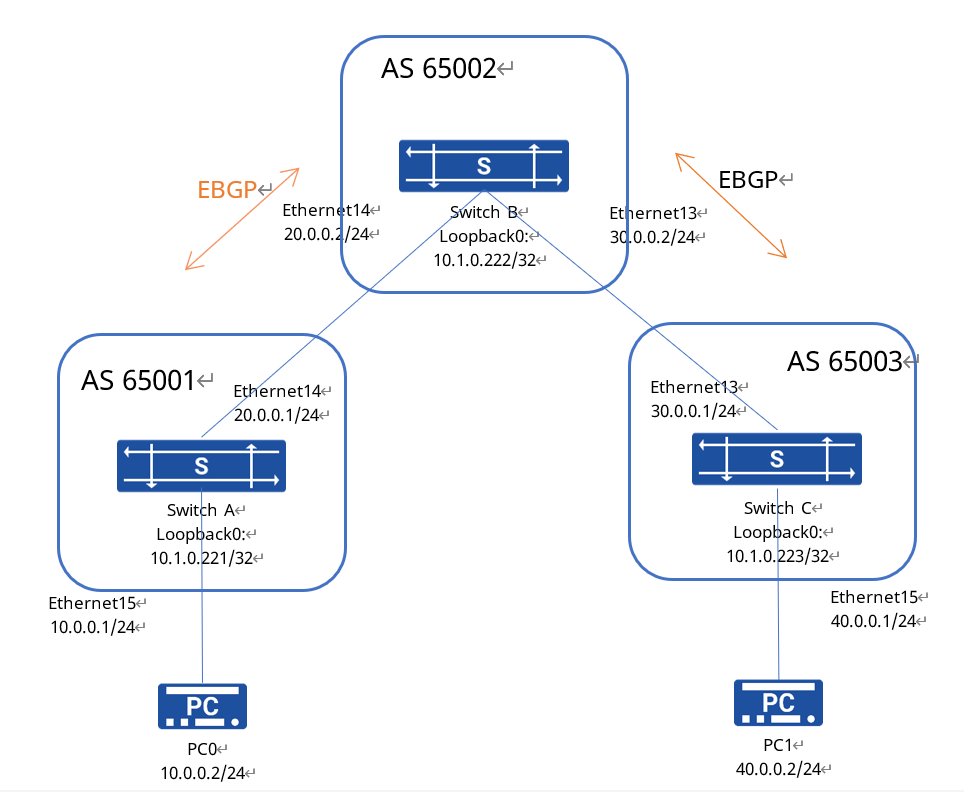
15.5.1.3 Configuration ideas
- First check that the status of each interface is UP and that the wiring is correct.
- Configure the IP address of each interface and the Loopback0 IP.
- Configure the AS number. The configuration takes effect after saving and rebooting.
- Use the IP address of the direct connection port to establish an EBGP neighbour.
- As the SONiC switch does not automatically introduce directly connected routes, they need to be introduced manually.
15.5.1.4 Configuration steps
SwitchA
sonic# configure terminal
sonic(config)# interface ethernet 0/15
sonic(config-if-0/15)# ip address 10.0.0.1/24
sonic# configure terminal
sonic(config)# interface ethernet 0/14
sonic(config-if-0/14)# ip address 20.0.0.1/24
sonic# configure terminal
sonic(config)# interface loopback 0
sonic(config-loif-0)# ip address 10.1.0.221/32

sonic(config)# route-map FROM_BGP_PEER_V4 permit 65535
sonic(config-route-map)# exit
sonic(config)# router bgp 65001
sonic(config-router)# bgp router-id 10.1.0.221
sonic(config-router)# no bgp ebgp-requires-policy
sonic(config-router)# neighbor 20.0.0.2 remote-as 65002
sonic(config-router)# address-family ipv4
sonic(config-router-af)# redistribute connected
SwitchB
sonic# configure terminal
sonic(config)# interface ethernet 0/14
sonic(config-if-0/14)# ip address 20.0.0.2/24
sonic# configure terminal
sonic(config)# interface ethernet 0/13
sonic(config-if-0/13)# ip address 30.0.0.2/24
sonic# configure terminal
sonic(config)# interface loopback 0
sonic(config-loif-0)# ip address 10.1.0.222/32

sonic(config)# route-map FROM_BGP_PEER_V4 permit 65535
sonic(config-route-map)# exit
sonic(config)# router bgp 65002
sonic(config-router)# bgp router-id 10.1.0.222
sonic(config-router)# no bgp ebgp-requires-policy
sonic(config-router)# neighbor 20.0.0.1 remote-as 65001
sonic(config-router)# neighbor 30.0.0.1 remote-as 65003
sonic(config-router)# address-family ipv4
sonic(config-router-af)# redistribute connected
SwitchC
sonic# configure terminal
sonic(config)# interface ethernet 0/15
sonic(config-if-0/15)# ip address 40.0.0.1/24
sonic# configure terminal
sonic(config)# interface ethernet 0/13
sonic(config-if-0/13)# ip address 30.0.0.1/24
sonic# configure terminal
sonic(config)# interface loopback 0
sonic(config-loif-0)# ip address 10.1.0.223/32

sonic(config)# route-map FROM_BGP_PEER_V4 permit 65535
sonic(config-route-map)# exit
sonic(config)# router bgp 65003
sonic(config-router)# bgp router-id 10.1.0.223
sonic(config-router)# no bgp ebgp-requires-policy
sonic(config-router)# neighbor 30.0.0.2 remote-as 65002
sonic(config-router)# address-family ipv4
sonic(config-router-af)# redistribute connected
PC
Separate routes are configured on the two PCs, with the destination segment being the IP of the other PC and the next hop being the IP of the opposite end.
15.5.1.5 Validation
1.Check if the BGP connection is established successfully
sonic# show ip bgp summary2.Verify connectivity using the ping command
PC0 and PC1 can ping each other.



Leave a Reply